If you manage your own warehouse and run Shopify, you have almost certainly felt this gap. Your Shopify admin shows products, orders, inventory quantities, locations, and fulfillment status. It accepts orders. It decrements inventory when something sells. It can record inventory adjustments.
But Shopify cannot tell you where inside your warehouse an item actually lives, who should go and get it, whether the right unit was picked, whether the order was verified at pack, or whether the delivery that arrived this morning matched what was on the purchase order.
That gap — between inventory visibility and warehouse operations — is where most growing Shopify merchants lose time, make errors, and accumulate the drift that eventually causes stockouts and oversold orders.
This guide covers what Shopify warehouse management actually requires, what Shopify provides natively, when Shopify alone is enough, and when a merchant needs a dedicated WMS.
Shopify vs WMS: Capability Comparison
| Shopify covers | A WMS controls |
|---|---|
| Products and variants | Physical warehouse locations and bins |
| Available inventory quantities | Receiving validation against purchase orders |
| Shopify inventory locations | Barcode-driven warehouse execution |
| Orders | Picking workflows and pick assignment |
| Fulfillment status | Pack verification before shipment |
| Inventory adjustments | Operational traceability and movement history |
The distinction is not that Shopify is missing inventory. Shopify is the commerce and inventory record. A WMS is the operational layer that keeps that record true while stock moves through the building.
What Shopify Actually Includes for Inventory
Shopify's built-in inventory tools are genuinely useful at low volume. Understanding exactly what they cover helps you identify precisely where the gap begins.
Stock Level Tracking Per Variant
Shopify tracks inventory at the product variant level across multiple locations. When an order is placed, it decrements the relevant SKU automatically. When you receive new stock, you can adjust quantities manually or via a connected app. This is the foundation — and it works well when operations are simple.
Multiple Location Support
Shopify supports multiple inventory locations and can route orders to fulfil from specific locations. You can set priority, transfer stock between locations, and view inventory per location in the admin. This is useful for merchants with a retail store alongside a warehouse, or who fulfil from multiple sites.
What it does not do: manage the physical operations within any location. It knows you have 47 units of SKU XYZ at Warehouse 1. It does not know where in that warehouse those 47 units are, which should be picked first, or whether they are in a sellable condition.
Basic Low-Stock Alerts
Shopify can notify you when a product reaches a quantity threshold you define. This is a basic demand signal — not demand forecasting, not restock risk scoring, but enough to prompt a manual reorder decision for merchants at low volume.
Transfer Records Between Locations
Shopify supports stock transfers between locations with a basic record of what was transferred and when. There is no scan verification, no discrepancy detection, and no audit trail of who moved what — just a quantity adjustment between two location totals.
The Core Distinction
Shopify's tools are inventory visibility — they tell you what you have. Warehouse management tells you where it is, how it moves, and what to do next. Most merchants do not notice the gap until order volume increases and manual processes start breaking under the load.
When Shopify Alone Is Enough
Shopify alone may be sufficient when fulfillment is simple, one person handles inventory, physical locations are obvious, manual reconciliation is realistic, and warehouse execution complexity is low.
That usually means stock is stored in a small number of obvious places, order volume is manageable, returns are rare, and the person receiving inventory is also close enough to the picking and packing work to catch mistakes quickly. In that environment, Shopify's product records, available quantities, locations, orders, fulfillment status, and inventory adjustments can be enough to keep the operation moving.
The risk starts when the physical work becomes bigger than one person can hold in their head.
When You Need a WMS
You need a WMS when Shopify's inventory record is no longer enough to control the warehouse work that creates that record.
The operational triggers are usually visible before the software decision is obvious: multiple operators touch inventory, products live across bins or zones that are not obvious from memory, supplier deliveries arrive with discrepancies, picking errors reach the packing bench or the customer, barcode workflows become necessary, inventory drift keeps returning after recounts, or the team needs root-cause traceability instead of another manual adjustment.
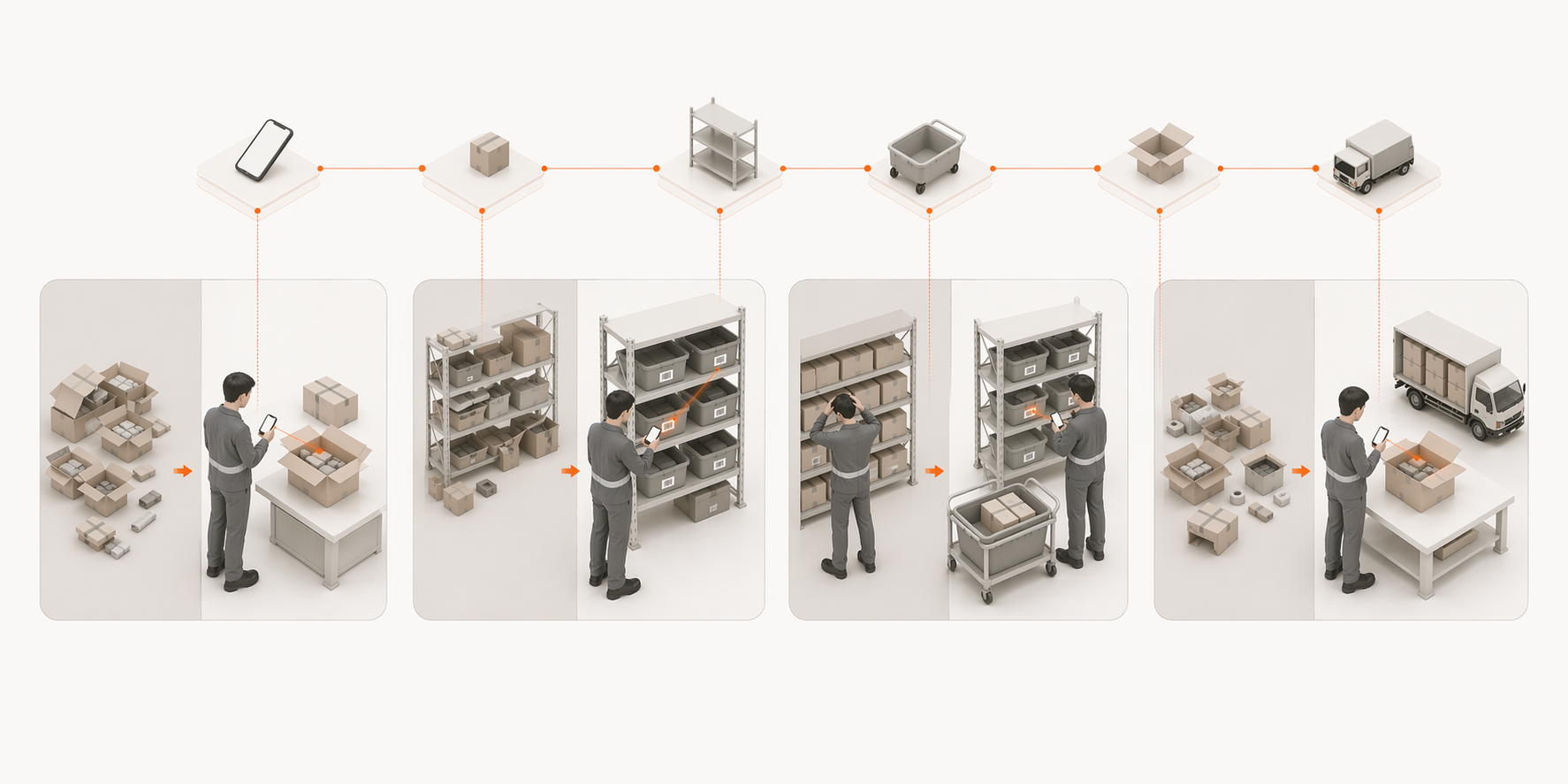
At that point, warehouse management is not just a cleaner inventory screen. It is the system of control for receiving, stowing, picking, packing, returns, adjustments, and every movement that changes what Shopify should believe.
What Warehouse Management Actually Means
A true warehouse management system provides five core capabilities that Shopify does not.
01.Receiving workflows
When a supplier delivery arrives, a WMS provides a structured receiving process: scan items in against the purchase order, record discrepancies immediately, assign received stock to specific warehouse locations, and update inventory in real time. Every delivery becomes a verified, timestamped event — not a manual quantity adjustment made after counting.
Generic receiving example: a purchase order expects 50 units, but the delivery contains 47. Shopify can hold an inventory quantity, but warehouse execution has to establish what physically arrived. The receiving confirmation should make 47 the warehouse truth, while keeping the 3-unit shortage traceable instead of silently treating all 50 as received.
This matters because a single PO miscount creates a cascade: false stock levels, overselling, emergency reorders, stockouts, refund spikes, and wasted time recounting. Scan-based receiving prevents the cascade at the source.
02.Bin and location tracking
A WMS knows that SKU-103 is in Aisle 2, Shelf B, Bin 14 — not just "Warehouse 1." This enables directed putaway (telling operators exactly where to stow incoming stock), directed picking (routing pickers to the right location without searching), and cycle counting (auditing specific locations rather than the entire warehouse).
Without bin tracking, a warehouse with 500+ SKUs becomes increasingly difficult to operate accurately as it grows.
03.Barcode and scan-driven operations
Every physical movement — receive, stow, pick, pack, return — is confirmed by a scan. The scan is the record. This eliminates the gap between physical reality and system state that causes inventory drift. It also creates an immutable audit trail: every movement has a timestamp, an operator ID, and a location.
04.Pick path optimisation
A WMS routes pickers through the warehouse efficiently — grouping items by location, sequencing picks to minimise travel, and batching multiple orders where possible. At 20 orders a day, this is nice to have. At 200 orders a day, it is the difference between a warehouse that runs on time and one that doesn't.
05.Immutable event ledger
A WMS records every stock movement as an event — not just a snapshot of the current count. This means you can replay exactly what happened to any SKU at any point in time. When stock is wrong, you do not have to guess — you can trace every movement back to its source. Shopify stores the current number. A WMS stores the history that produced it.
The Specific Failure Modes of Running a Warehouse on Shopify Alone
These are not theoretical. They are the operational problems that consistently appear as Shopify merchants scale their warehouse operations without a dedicated WMS.
Monday Morning Reconciliation
The weekly ritual of exporting orders, cross-checking pick lists, manually adjusting inventory counts, and trying to explain why Shopify says 23 but the shelf says 19. This typically consumes 2-4 hours of a senior team member's time every week — time that could be spent on growth rather than data repair.
Overselling From Count Lag
Shopify says 5, the shelf has 2. A customer orders 3 and gets a cancellation email. The gap between Shopify's count and physical reality — inventory drift — is the most direct cause of overselling for merchants who manage their own warehouse. See our full guide to stopping overselling on Shopify for the specific fixes.
No Root Cause Tracing
When stock is wrong, Shopify cannot tell you why. It stores the current count — not the sequence of events that produced it. When a discrepancy appears, you ask the team, review paper records, and piece together what probably happened. With a WMS event ledger, you replay exactly what happened. This distinction becomes critical when the same discrepancy keeps recurring — you need to know the root cause, not just reset the count.
Generic drift example: Shopify shows 23 available, but the shelf has 19 units. The useful warehouse question is not only "What quantity should Shopify show?" It is "What physical event caused the four-unit difference?" The cause might be a short delivery, a wrong pick, an unprocessed return, or a damaged unit. Scan and event traceability give the team a movement history to inspect instead of another unexplained adjustment.
Return Re-Entry Chaos
A returned item arrives, gets inspected, is deemed sellable — and sits in a returns area while Shopify still shows it as sold. Over 50 returns a month, that is 50 units of invisible stock. Without a scan-based returns process that updates Shopify at the point of stow, returns consistently inflate your drift. See our inventory drift guide for the full breakdown.
Receiving Discrepancy Blindness
A supplier delivers 94 units against a PO for 100. Without a scan-based receiving workflow, the instinct is to receive everything and chase the shortage later. If Shopify gets updated for 100 rather than 94, 6 phantom units enter the system — and your inventory counts are wrong before the first order ships from that stock.
How a WMS integrates with Shopify
A Shopify WMS integration is not just two systems syncing numbers. Shopify owns the commerce and order context. The WMS controls the physical warehouse execution. Verified warehouse events then flow back to Shopify so the commerce record reflects what happened on the floor.
The merchant-visible flow looks like this:
- Shopify receives the order and holds the product, customer, payment, inventory, location, and fulfillment context.
- The warehouse system receives the work to execute: what needs to be received, picked, packed, shipped, returned, or adjusted.
- Operators complete verified warehouse actions — receiving against a purchase order, scanning a pick, confirming a pack, stowing a return, or recording an adjustment.
- Those verified events establish warehouse inventory truth because they describe the physical movement that actually happened.
- Shopify receives the resulting inventory or fulfillment update, so the storefront and admin stay aligned with warehouse reality.
OAuth connection, not CSV exports
OAuth is the connection method that lets a Shopify merchant approve scoped access from the Shopify admin. Instead of exporting CSV files or manually moving order data between systems, the WMS can read the Shopify context it needs — products, inventory, orders, and locations — through the approved integration.
Webhooks for real-time order flow
Webhooks support the operational handoff. When Shopify receives an order, the warehouse system can receive the work event and place it into the right workflow: block check, orders pool, pick queue, packing, or fulfillment update. In the other direction, verified warehouse actions can trigger inventory or fulfillment updates back to Shopify.
A single inventory writer
The single-writer principle still matters. If multiple apps write inventory quantities independently, Shopify can end up reflecting whichever update arrived last rather than the physical event that should control the count. The operational contract is simple: one system should control inventory-changing warehouse events, and other systems should read from that truth.
What Shopify Plus changes
Shopify Plus can change scale and rate-limit headroom, but it does not change the basic separation of responsibility. Shopify still owns commerce and order context. The WMS still controls physical execution. Verified warehouse events still need to update the Shopify record.
The integration question, then, is not "Do the numbers sync?" It is "Does the system turn physical warehouse actions into verified events Shopify can trust?"
What to Look for in a Shopify WMS
This section is not a vendor comparison. It is the capability checklist to use once you understand where Shopify stops and where warehouse execution begins.
When evaluating a WMS for a Shopify warehouse, look for evidence that it can control the physical work your operation actually needs:
Once you know which warehouse capabilities you need, the next question is which WMS fits your operation. For vendor comparison, pricing, and product-selection criteria, use the Best WMS for Shopify small business guide.
Warehouse management needs by industry
The failure modes above hit different verticals differently. Apparel operations break on variant complexity — size and colour matrices multiply every SKU into dozens of trackable units, covered in our apparel guide. Beauty and supplements add expiry dates and batch tracking that Shopify has no concept of — see the beauty and supplements guides. Auto parts merchants need fitment verification before anything ships — detailed in the auto parts guide. And sports and hobby retailers manage seasonal swings across deep catalogues — covered in the sports and hobby guide.
The Right Starting Point
Most merchants hitting the limits of Shopify's native inventory tools are processing somewhere between 50 and 200 orders per day, managing 100 to 500 active SKUs, and running a warehouse team of 2 to 10 people. They are losing 3 to 5 hours per week to manual reconciliation and experiencing inventory discrepancies that erode customer trust.
The answer is not to buy the largest WMS you can find. The right starting point is to match the warehouse layer to the complexity now visible in the operation: receiving accuracy, bin discipline, barcode execution, pick and pack verification, traceability, and Shopify integration.
LaSyncro is one option for merchants in this gap: a Shopify-connected warehouse layer for teams that need physical operations controlled without adopting an enterprise WMS. If you are currently stuck between Shopify's basic tools and enterprise systems you do not need, start with the Shopify warehouse workflow guide to see how stock should move from receiving to shipping without inventory drift.
LaSyncro adds a full warehouse management layer to Shopify — operational in 60 seconds, not 6 weeks.
Start free